

Before you start
You need Sightline installed and open (Install on Mac or Install on Windows), and paper or a blank document for the last drill. Lesson 1: Your first observation helps but is not required.- Go to Settings → General.
- Turn on Demo mode. Your own students are hidden while it is on and come back when you turn it off.
- Go back to the student list. Sam Sample is in the first row, marked Start here.
Define one occurrence of the behavior
A count means something only when you have decided, before you start, what counts as one occurrence. Sam’s sample observations use this definition of off-task behavior:Engagement with anything other than the assigned task or activity for 3 or more consecutive seconds. Includes looking away from the task or teacher, talking with peers off-topic, playing with materials unrelated to the task, or putting the head down on the desk. Excludes actions the assigned task or activity requires, such as gathering materials, sharpening a pencil, or asking a permitted question about the work.The 3-second threshold is the part that matters in the drill below. Keep it in mind.
Practice drill: set up the observation
- Open Sam Sample and select Start Observation.
- Select the method card at the top left and choose Frequency.
- Type Off-task in Add behavior…, then paste the definition above into the definition field under it.
- Check the Key beside the behavior. It shows 1, the key you press to count.
- Type 2 in Length. Two minutes is not one of the preset lengths, so you type it.
- Select Begin demo. The recorder opens with the clock stopped. Don’t start it yet.
Record from a script
Sam is at his desk writing answers on a worksheet while the teacher stands at the front of the room. Read the whole script once before you start. The recorder’s clock shows the time observed against the length, such as 0:25 / 2:00. The times are approximate; what matters is the decision at each line.Practice drill: record
- Select Start and follow the script.
- At 0:25, decide whether the glance counts before you press anything.
- Let the clock reach 2:00. The completion screen opens with Session complete at the top.
Read the Summary
Results opens with a Summary card. For frequency it shows each behavior’s rate per minute as the headline, with the number of occurrences under it. Sightline divides the count by the minutes the clock ran, so paused time is left out. Results explained explains each number in full.Practice drill: read the results
- On the completion screen, look at Duration. It reads about 2:20: the time from start to end, including the pause.
- Select View Results. In demo mode, Review later keeps nothing, so View Results is the only way to see this observation.
- Find Off-task in the Summary card. It shows 2 /min, with 4 occurrences under it.
- Scroll to Event Record and check Timeline. Your four marks should sit near 0:10, 0:40, 1:15, and 1:45.
- Find your note under Observation Notes.
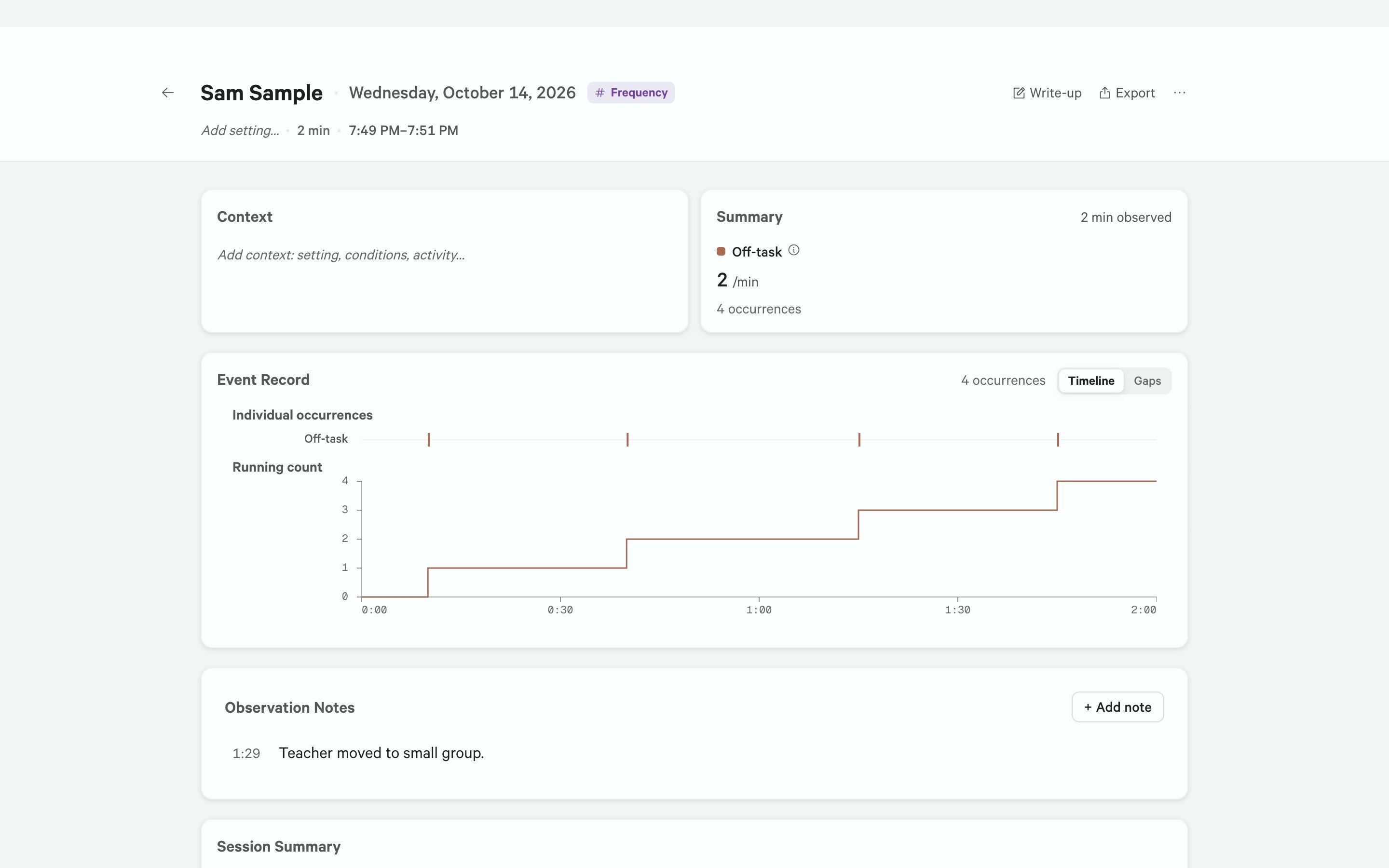
The practice observation's Results: 4 occurrences in 2 minutes observed. Shown in demo mode.
Read a finished write-up
Your practice observation isn’t kept, so it has no write-up to open. Sam’s ABC observation of Oct 15, 2025 has one: it is the only sample observation with a written example. Read it to see how a write-up ties each number to the record.Practice drill: read the example
- Go back to Sam Sample and select Sessions.
- Select the ABC observation dated Oct 15. If a short tour opens, now or with the write-up, step through it or click outside it.
- Select Write-up. The write-up opens on the left and the observation’s results on the right.
- Read the note under the title: “Example write-up. Written for this sample from the six entries in the record. Not generated on this computer.” Opening it doesn’t run AI.
- Read the second paragraph. It opens “Six ABC entries were recorded: four off-task and two out-of-seat.” The results on the right show one behavior at a time, starting with Off-task. Count its rows under ABC Entries, then choose Out-of-seat at the top of the results and count again. The numbers should match.
- Read the last paragraph. It says what the entries can’t show: “They do not by themselves establish why the behavior occurred.”
Write one sentence
Now write one sentence about your practice observation that another reader could check against the record. Write it on paper or in any document; demo mode won’t keep it.Practice drill: write the sentence
- Give the length of the observation and what Sam was doing.
- Give the count and the rate, with the behavior named as it was defined.
- Add what changed in the room, from your note.
- Leave out why Sam was off-task. One short observation can’t show that.
“During a 2-minute observation of independent written work, Sam was off-task 4 times, a rate of 2 per minute; the teacher moved to a small group about 90 seconds in.”Check yours against it. Does it give the length as well as the count? Does it give the rate? Does it say what was happening in the room? Does it stay with what you saw? Describe results in a write-up shows how to report frequency and every other measure. Well done. You have taken one observation from the first count to a report sentence.
When you finish
Your practice observation is already gone. To go back to your own students:- Go to Settings → General.
- If you changed one of Sam’s sample records, select Reset… beside Reset demo data, then Reset. Otherwise skip this step.
- Turn off Demo mode.